
As part of New in Calxa updates, our next release in June will include the ability to merge scenarios into a budget. You’ll be able to merge any scenario into one or more budgets. The change we’re introducing includes the concept of Budget Snapshots to ensure we do the merge safely and you can easily restore the snapshot if you don’t like the result.
New in Calxa: Budget Snapshots
A snapshot is a copy of your budget taken at a point in time and can be easily restored. We will automatically create a snapshot before major changes, such as merging scenarios into a budget or running the budget factory.
The snapshot will include all business units for all years, just as a standard budget version does. We’ll keep them for 12 months and you can restore them at any time in that period. The only caveat is that the restored snapshot won’t include budgets for any accounts or business units that have been deleted in the meantime.
Merging Scenarios
Merging combines the information in your scenario with a chosen budget. You could merge a scenario into more than one budget if that makes sense to you. Before you confirm the merge, we will check for any potential conflicts and give you the opportunity to resolve them before continuing.
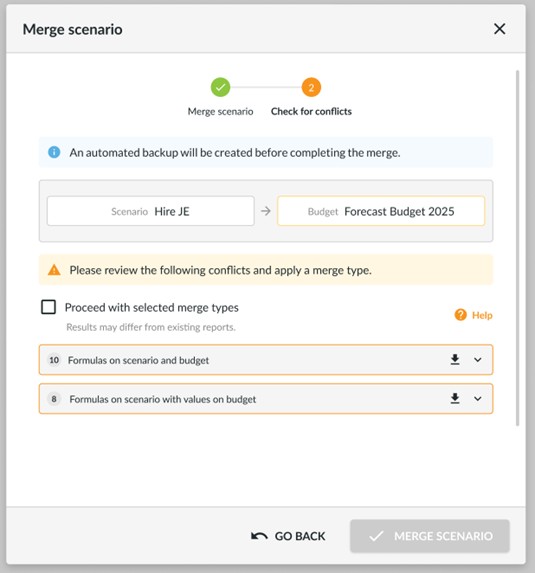
Some examples of potential conflicts are:
- Formulas on one or more cells on the scenario conflicting with existing formulas on the budget
- Formulas in the scenario conflicting with existing values in the budget
- Formulas in the scenario that would create a circular reference
Once you have resolved the conflicts, we’ll take a snapshot of the budget and merge the scenario. You can then choose to archive, delete or keep open the scenario.
Dynamic Bank Movement Report
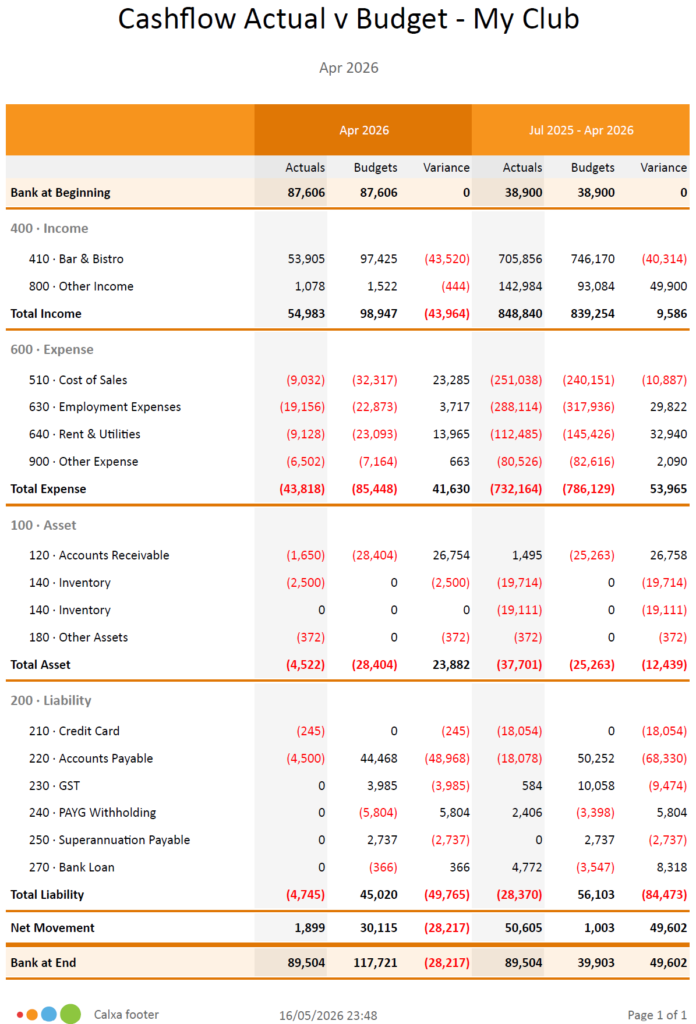
We recently added to our Dynamic Report Builder options with a template modelled on the Bank Movement Reports. This starts each column with the opening bank balance and ends with the closing bank balance. Your Account Tree can then group and summarise the accounts between them.
Combine this with an Account Tree modelled on your Cashflow Statement groupings (Operating, Investing, Financing) to build an Actual vs Budget variant of that report. Use it for any cashflow groupings for past or future periods.
To see the recent changes, look out for our change logs with all the details. There’s lots more we’re working on and coming up as new in Calxa over the next few months.
Feedback is Always Welcome
We value your feedback. To make the most of this feedback, we record every scrap of information we pick up from our day-to-day conversations with you. Here, our quest is to learn what you need. Ultimately, we want to deliver what will help you get your work done easier. So, feel free to give us unsolicited suggestions at any time. Some will take time to implement. However, sometimes we get ideas from customers that are very simple to change and make a big difference.