

This week’s New in Calxa release includes the enhanced Dynamic Report Builder. We have taken the reports to the next level with new column types so you can create repeating groups and your own calculations, giving you more control and better comparisons. This update introduces a significant step forward for the Dynamic Report Builder, adding advanced options that give finance teams more control over:
- Layout,
- Comparisons
- And Custom Calculations
All without sacrificing structure or consistency. These enhancements are aimed squarely at one goal:
Helping you build reports that match how your business actually wants to measure your financial performance.
New Column Types: Greater Flexibility Where It Counts
Calculation Columns: Build the Numbers You Need
The new Calculation Column allows you to create custom formulas that reference values from other columns in your report. This is particularly useful when standard variance logic doesn’t tell the full story—for example:
- Custom differences that don’t follow favourable/unfavourable rules
- Ratios such as % of Sales or cost per unit
- Bespoke management metrics that don’t exist in the chart of accounts
Rather than exporting data to Excel for one‑off calculations, you can now embed these formulas directly into your Dynamic Report templates.
Group by Date Range: Keep Related Numbers Together
With Group by Date Range, you can group multiple columns under a single, fixed reporting period. All columns in the group share the same date range—making it easy to present related values side by side, such as:
- Actual, Budget and Variance for the same month
- Actual, Budget, Forecast and Variances for the month or any date range
Repeating Multi‑Period Columns: Scale Your Reports Automatically
The new Repeating Multi‑Period option lets you build a set of columns that automatically repeat across successive reporting periods—monthly, quarterly, or yearly. The number and length of periods are controlled by the report’s Report Periods setting.
Instead of manually creating each month or quarter, one template can expand dynamically as periods change. You could, for example, show actuals for the completed months of the year, insert a Year-to-date column and then finish with the forecast for the remaining months.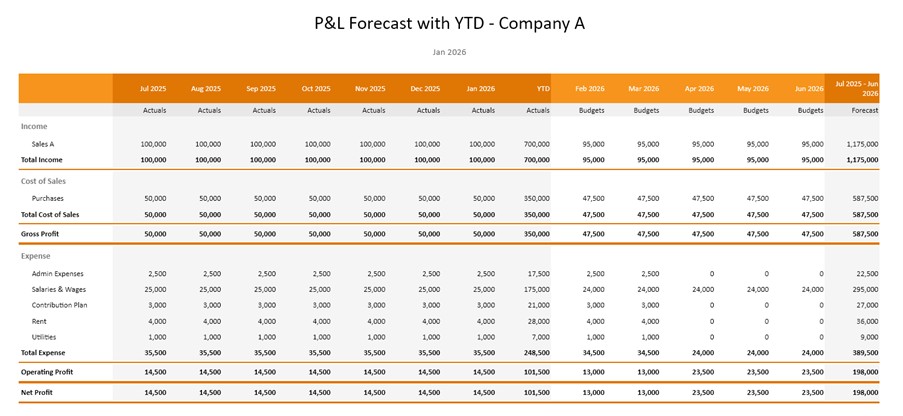
Multi‑Column Business Unit or Organisation Comparisons
This enhancement allows you to create repeating columns for each selected business unit or organisation, producing powerful comparison‑style layouts. Common use cases include:
- Side‑by‑side entity comparisons
- Departmental performance views, including balance sheets
- Each entity shown alongside a consolidated total
All of this can now be handled within a single Dynamic Report template.
Usability Improvements That Make a Real Difference
Collapsible Report Criteria Panels
All Report Criteria panels—across both Dynamic and Pre‑Configured reports—are now collapsible. This gives you more space to focus on the report preview itself.
A cleaner workspace makes report design faster and less frustrating, especially for complex templates.
Improved KPI Formula Editor
We have also improved the shared formula editor used in both the KPI Builder and Calculation Columns. Enhancements address:
- Cursor behaviour and spacing
- Auto‑complete positioning
- Insertion and deletion of formula components
These changes make formula entry more predictable and easier to work with.
What This Release Means for Finance Teams
Taken together, the new enhancements move the Dynamic Report Builder from “flexible” to highly configurable, while staying true to Calxa’s finance‑first design principles.
Finance teams can now:
- Build richer comparison reports without Excel
- Standardise complex layouts across periods and entities
- Embed custom calculations directly into reports
- Deliver clearer, more intuitive financial insights
All while keeping reporting logic controlled, repeatable, and manageable inside Calxa.
To see the recent changes, look out for our change logs with all the details. There’s lots more we’re working on and coming up as new in Calxa over the next few months.
Feedback is Always Welcome
We value your feedback. To make the most of this feedback, we record every scrap of information we pick up from our day-to-day conversations with you. Here, our quest is to learn what you need. Ultimately, we want to deliver what will help you get your work done easier. So, feel free to give us unsolicited suggestions at any time. Some will take time to implement. However, sometimes we get ideas from customers that are very simple to change and make a big difference.